
Pay once - no subscriptions, ever20% off any paid plan - use code GUESTI20Try the Free plan - no credit card requiredPay once - no subscriptions, ever20% off any paid plan - use code GUESTI20Try the Free plan - no credit card requiredPay once - no subscriptions, ever20% off any paid plan - use code GUESTI20Try the Free plan - no credit card requiredPay once - no subscriptions, ever20% off any paid plan - use code GUESTI20Try the Free plan - no credit card required
20% off any paid plan - use code GUESTI20
GuestiGram

Event planning

Export seating and meal reports

Send your venue a seating list, room plan and individual meal selections.

For HostsUpdated 11 October 2026

Before you start

Sign in to your host account and check the event name before making changes.
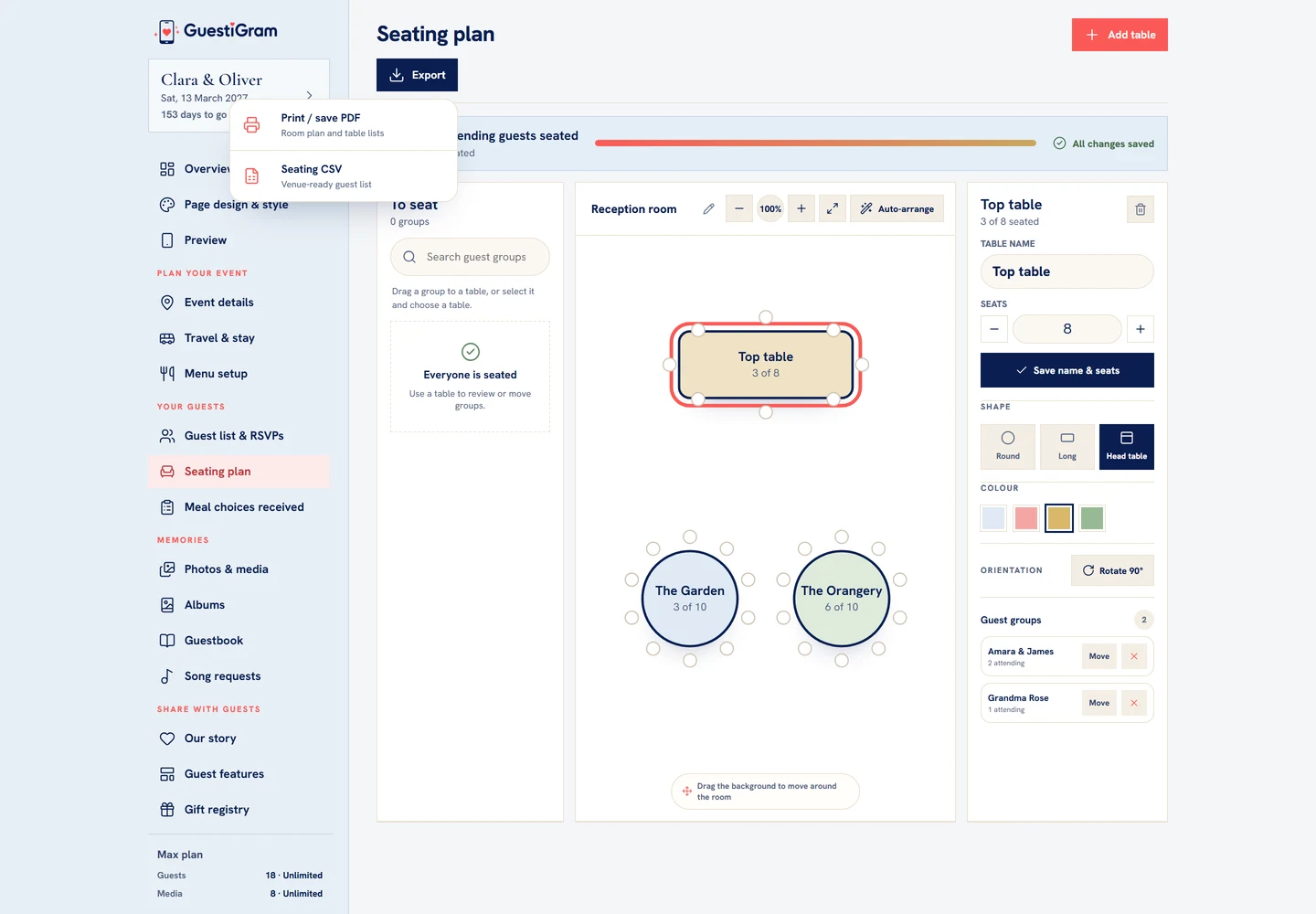
Seating plan’s Export menu provides Seating CSV and Print / save PDF.
Demo example Seating plan’s Export menu provides Seating CSV and Print / save PDF.

What to do

  1. Check complete RSVPs, seating assignments and saved meal choices before exporting.
  2. Open Seating plan and choose Export, then Seating CSV for a spreadsheet.
  3. Choose Print / save PDF from the same menu for the room plan and table lists. Allow the print window if your browser blocks it.
  4. Open Meal choices received and choose Download venue PDF.
  5. Open each exported file and check totals, names, invitation types and dietary details before sharing with the venue.

Check the result

Compare the exports with the current attending guests and your venue’s required numbers.

Good to know

  • Seating and meal reports count attending people who are eligible for those features.
  • Use a fresh export after changing an RSVP, invitation type or table assignment.
  • After hosted access ends, the 30-day recovery page also offers Guest list CSV and Meal report PDF. There is no general guest-list CSV button on the active Guests page.

Need help with this?

Tell us your event name, device and what happened. Do not include passwords or private guest details.

Contact support

Still need a hand?

Contact GuestiGram support

Tell us which event and device you are using, but never send a password, verification code or complete payment details.

Contact supportUse the host account email where possible so we can identify the event safely.
© 2026 GuestiGram · Made with ♥ for every celebration
Guestigram is a trading name of Saasybrands Ltd, registered in England and Wales (company no. 17364531). Registered office: International House, 22-28 Wood Street, Doncaster, DN1 3LW, United Kingdom.
Pay once · No subscriptions