Before you start
Add your host names and event date in Event details. You can preview and edit designs on every plan; Pro and Max include printable downloads.
What to do
- Open Photo-sharing designs in the host menu. Choose Business cards or Table signs to see the matching sizes, then choose one of the 20 designs.
- Each design starts with your host names and event date. The original template stays unchanged.
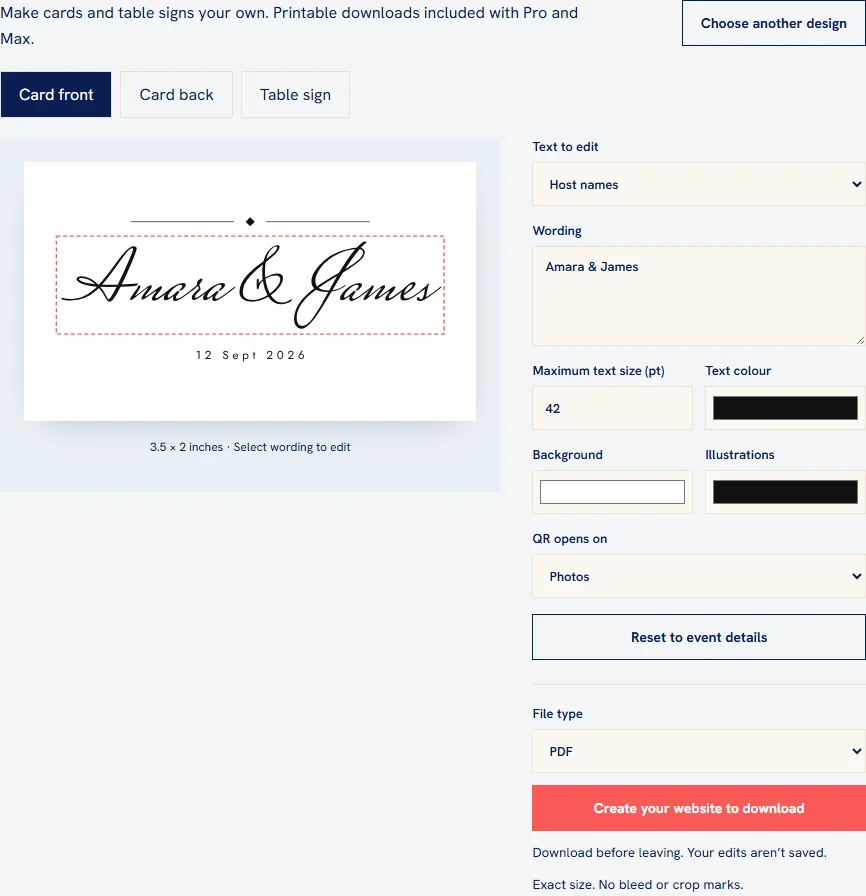
- Choose Card front, Card back or Table sign. Select wording in the preview, or choose it under Text to edit. Edit the wording, size and colours.
- Choose where the QR opens. Photos is selected initially. Cards and signs can use different destinations without changing your main event QR.
- Check the preview and download before leaving. Edits are temporary: choosing another design or reopening the page starts fresh.
- On Pro or Max, choose PDF, JPG, PNG or SVG and download. Cards include both sides; the sign is a separate file.
Check the result
Open your downloaded files, check both card sides and scan a test print to confirm the correct event and destination.
Good to know
- Cards are 3.5 × 2 inches and signs are 5 × 7 inches. Files contain no bleed, crop marks or multiple-up print sheets. Print PDFs at actual size rather than fit to page.
- JPG and PNG files are prepared at 300 pixels per inch. Card image and SVG downloads contain both sides in a ZIP; card PDFs have two pages.
- SVG wording is converted to vector shapes so fonts keep their appearance. To make another copy later, choose the template again and personalise it before downloading.
- Cards and signs keep separate wording, colours and QR destinations. Your edits stay in the current editor while you switch between card sides and the sign. Reset to event details restores names and dates on the selected side.
- If text does not fit or contains a character the design font cannot display, shorten it or reduce its size before downloading. Test a printed QR before ordering a full print run.
- Printable downloads require active Pro or Max access. If you need to upgrade, do so before personalising the design you want to download.
Need help with this?
Tell us your event name, device and what happened. Do not include passwords or private guest details.
Contact support