
Photos and videos together
Collect both in the same event. Guests can share after the celebration too, while your plan remains active. A browser upload needs an internet connection; a QR code does not provide venue Wi-Fi.
Every guest has a different view
With GuestiGram, collect guests' photos and videos through one wedding link or QR code. Guests upload in their browser without installing an app or creating an account. Keep the originals, organise albums and enjoy the moments you couldn't see.
No credit card needed · No app or account for guests
How it works
Choose a design, add your wedding details and decide whether photos and videos need approval before guests can see them.
Put it on invitations or table signs. Guests select photos and videos from their phone and upload when they have an internet connection.
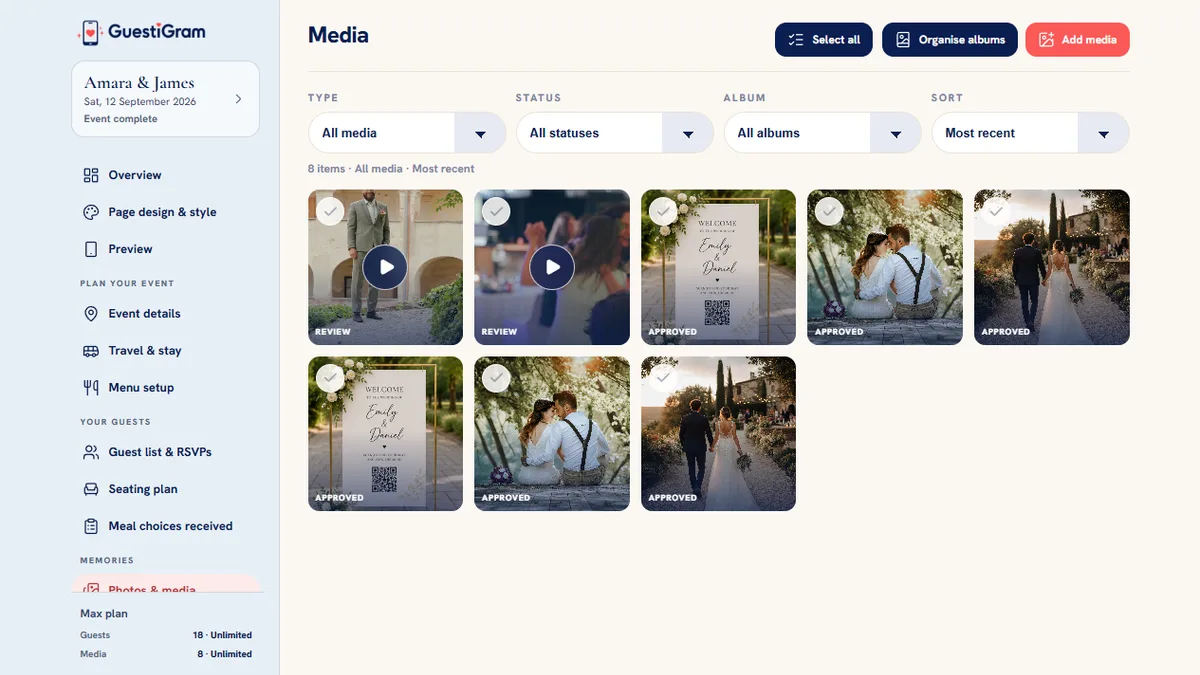
Review uploads in the host gallery, filter your collection and organise albums. Download originals and keep a separate backup before hosted access ends.
Collect both in the same event. Guests can share after the celebration too, while your plan remains active. A browser upload needs an internet connection; a QR code does not provide venue Wi-Fi.
Your event has its own link, with optional PIN protection. You can require approval separately for photos and videos. People with the shared link and any required PIN can access the guest experience, so share it deliberately.
Download original photos and videos rather than relying on copies from social feeds. Preview images can be smaller for faster browsing. Hosted access has a plan-specific end date; downloaded originals can be kept in your own storage.
The same wedding website can include RSVPs, meal choices, venue details and the schedule. Guests already know where to go when it is time to share their pictures.
Every feature, on every plan
Start free or choose a one-off paid plan. Compare current prices in GBP, USD, EUR, CAD and AUD on our pricing page.
| Plan | Invited people | Uploads | Hosted access |
|---|---|---|---|
| Free | 15 | 20 | 7 days from account creation |
| Starter | 50 | 100 | 6 months from payment |
| Pro | Unlimited | Unlimited | 12 months from payment |
| Max | Unlimited | Unlimited | 24 months from payment |
Paid access begins when payment succeeds, regardless of your wedding date. Download your originals before access ends.
Compare prices and plans →No. Guests open your event link or scan the QR code and use a supported browser. The host creates an account to set up and manage the event.
Yes. Photos and videos share the plan's upload allowance. The Free plan includes 20 uploads, Starter includes 100, and Pro and Max have unlimited uploads during their access periods. Supported file formats and per-file limits still apply; see the upload guide.
Guest photos add personal viewpoints and candid moments. They cannot guarantee professional-quality coverage, good low-light results or every important moment. You can use guest collection alongside a photographer or as part of a carefully planned DIY approach.
Yes, while the event has active access and uploads are available. Share the link again after the wedding and ask guests to upload on a reliable connection.
Yes. The Free plan includes every feature, up to 15 invited people and 20 photo or video uploads, with seven days of access starting when your account is created.